Table of contents
- What does WooCommerce abandoned cart really mean, and why does it matter so much?
- Why do even “ready to buy” customers leave the checkout in real life?
- Why is it worth finding the real cause before changing your checkout?
- How can you identify, step by step, what makes customers abandon the cart?
- What mistakes do stores make most often when trying to reduce WooCommerce abandoned cart?
- How does WooCommerce abandoned cart affect sales, conversion rates, and profitability?
- When should you treat WooCommerce abandoned cart as a serious problem?
- How can you combine WooCommerce abandoned cart fixes with other WooCommerce improvements?
- What should you do if customers still abandon carts after changes?
- Who can help you reduce WooCommerce abandoned cart in a practical way?
- WooCommerce abandoned cart – common questions
WooCommerce abandoned cart. A lot of shoppers look ready to buy, then disappear right before payment. They add products to the cart, move into checkout, and still leave without completing the order. For many WooCommerce stores, that is where a big part of the lost revenue hides.
When that happens, the product is not always the problem. Very often, the real issue is friction near the end of the buying journey. It can be surprise costs, a long checkout, forced account creation, weak trust, limited payment options, or a flow that simply feels harder than it should. That is why reducing WooCommerce abandoned cart is not just about recovery emails. First, you need to understand what makes “ready to buy” customers stop.
What does WooCommerce abandoned cart really mean, and why does it matter so much?
A WooCommerce abandoned cart happens when a shopper adds products to the cart, or even starts checkout, but leaves before completing the order. That sounds simple. Still, it matters a lot because the customer was already close to buying. Baymard’s 2026 benchmark puts the average cart abandonment rate at 70.19%, which shows how much revenue is often lost at the very end of the buying journey.
For a WooCommerce store, this is not just a “normal ecommerce thing” you should ignore. It often means you already did the hard part: you got the visitor to the product page, convinced them to add something to the cart, and moved them toward checkout. Then the sale disappears at the final step. WooCommerce also points out that abandoned carts can drain the value of traffic you already paid for through SEO, ads, and UX work.
Why do even “ready to buy” customers leave the checkout in real life?
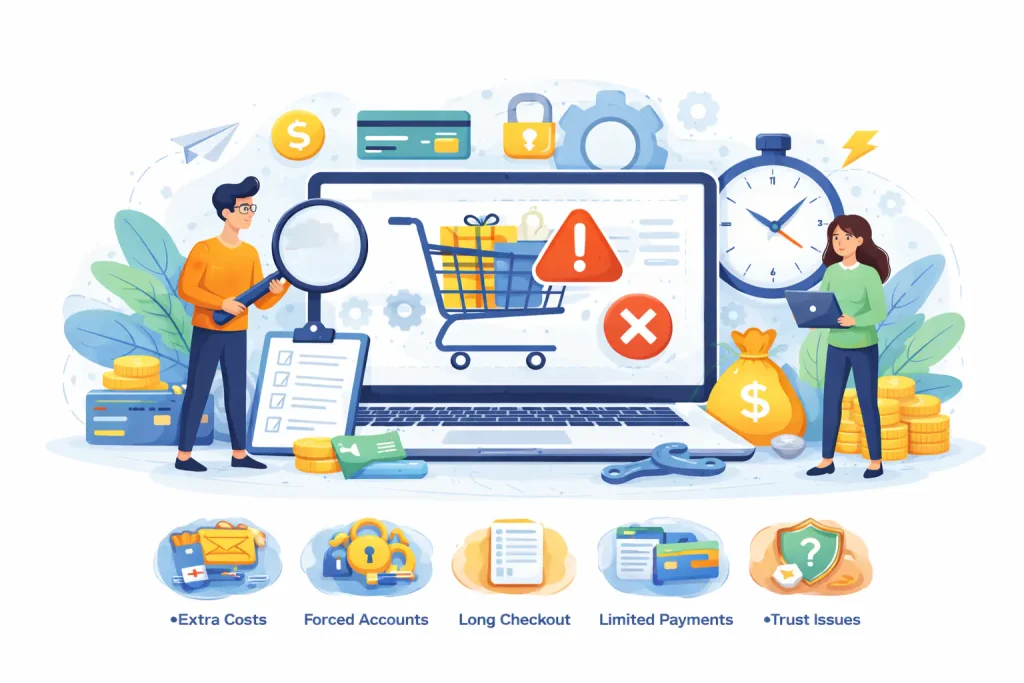
In many cases, shoppers do not leave because they changed their mind about the product. They leave because the checkout creates friction. Baymard’s latest data shows the biggest reason is still extra costs such as shipping, taxes, or fees, at 39%. Other major reasons include slow delivery at 21%, lack of trust at 19%, forced account creation at 19%, a long or complicated checkout at 18%, site errors or crashes at 15%, unclear total cost at 14%, and too few payment methods at 10%.
That is why even “ready to buy” customers still drop off. They may want the product. However, the final steps make the purchase feel harder, riskier, or more expensive than expected. WooCommerce’s own guidance makes the same point: cart recovery emails can help, but stores first need to solve the root cause of checkout friction instead of treating recovery as the main fix.
In WooCommerce, some of these issues are directly tied to store settings. For example, under WooCommerce > Settings > Accounts & Privacy, you can control guest checkout and customer account creation. That matters because forced sign-up is still one of the top abandonment triggers, and reducing that friction can make checkout feel much easier.
Why is it worth finding the real cause before changing your checkout?
Many store owners react too fast. They install another checkout plugin, add a coupon popup, or redesign the cart page before they know what is actually blocking conversions. The problem is that WooCommerce abandoned cart usually has more than one possible cause. Baymard’s data shows shoppers leave for very different reasons, from hidden costs to trust issues to technical errors. So if you guess, you can easily fix the wrong thing.
WooCommerce says the same in a more practical way: recovery should complement a well-optimized site, not replace real checkout improvements. In other words, abandoned cart flows are useful, but they should come after you reduce friction in the buying process itself. Otherwise, you are just sending people back to the same broken experience.
A clean diagnosis also saves time and money. One store may lose sales because shipping costs appear too late. Another may lose them because checkout feels too long. A third may have enough intent and traffic, but the site crashes, loads slowly, or does not offer the payment method people expect. When you know the real cause, the next step in WooCommerce becomes much clearer.
How can you identify, step by step, what makes customers abandon the cart?
Start with the checkout as it is now. Do not change five things at once. First, go through the full buying path like a real customer. Check when shipping costs appear, when the final total becomes clear, whether checkout forces account creation, and whether the payment options feel enough for the type of buyer you want. That order matters because Baymard’s latest data still shows the main abandonment reasons are surprise extra costs, slow delivery, trust issues, forced account creation, long checkout flows, site errors, unclear total cost, and too few payment methods.
Next, review the WooCommerce settings that directly affect friction. In WooCommerce > Settings > Accounts & Privacy, you can control guest checkout and customer account creation. That is important because account friction is still one of the most common abandonment triggers, and WooCommerce gives you direct control over that part of the experience.
Then look at what happens after the cart is abandoned. WooCommerce recommends treating recovery as a support layer, not the first fix. In practice, that means you should first remove the obvious blockers in checkout. After that, you can use abandoned cart emails and similar flows to recover the sales that still slip away.
What mistakes do stores make most often when trying to reduce WooCommerce abandoned cart?
The first mistake is guessing. Many stores assume the problem is price alone. However, Baymard’s benchmark shows abandonment is usually spread across several causes, not one. A store can lose sales because of shipping costs, weak trust, forced sign-up, poor checkout UX, limited payment methods, or technical problems. So when you guess, you often fix the wrong thing first.
The second mistake is making checkout more complicated while trying to improve it. For example, stores add extra fields, new steps, or unnecessary account logic. That usually backfires. Baymard reports that 18% of shoppers abandon because checkout is too long or too complicated, and its checkout research also highlights that reducing form burden improves checkout UX.
The third mistake is relying on recovery emails before fixing the core experience. WooCommerce is clear about this: cart recovery should complement a well-optimized site, not replace real checkout improvements. So if the same friction remains, your recovery flow may just send shoppers back to the same broken process.
How does WooCommerce abandoned cart affect sales, conversion rates, and profitability?
The impact is usually bigger than store owners expect. Baymard’s current benchmark puts average cart abandonment at 70.19%. That means a large share of shoppers drop out after they already showed strong buying intent. In business terms, that often means lost revenue at the most valuable moment of the journey.
It also affects the return on the traffic you already paid for. WooCommerce notes that stores invest in SEO, paid ads, and UX, but can still lose customers right at the finish line. So WooCommerce abandoned cart is not only a checkout problem. It is also a profitability problem, because weak checkout performance reduces the value of your marketing and product-page work.
The good part is that this area often has clear upside. Baymard’s breakdown shows several of the top abandonment reasons are practical and fixable. So if you reduce checkout friction in the right place, you are not chasing a vague “optimization.” You are improving one of the clearest points where revenue leaks out.
When should you treat WooCommerce abandoned cart as a serious problem?
You should treat it as serious when shoppers clearly show buying intent, but orders still do not happen. That usually means people reach the cart or checkout, then drop off before payment. Baymard’s current benchmark still puts average cart abandonment at around 70.19%, so this is not a small leak. It is often one of the biggest revenue gaps in an online store.
It becomes even more urgent when the issue affects pages or campaigns that matter most. For example, this includes best-selling products, paid-traffic landing pages, seasonal offers, or high-margin categories. WooCommerce also frames abandoned carts as lost value at the finish line, especially after you already invested in SEO, ads, and UX to get the shopper that far.
How can you combine WooCommerce abandoned cart fixes with other WooCommerce improvements?
The best results usually come when you do not treat WooCommerce abandoned cart as a standalone issue. First, reduce checkout friction. Then improve the related parts around it, such as cost transparency, payment options, trust, and account flow. That approach matches the main abandonment reasons Baymard reports, including surprise costs, forced account creation, long checkout, weak trust, and too few payment methods.
In WooCommerce, some of these fixes connect directly to store settings. Under Accounts & Privacy, you can enable or disable guest checkout and control account creation during checkout. After that, you can add recovery flows, such as abandoned cart emails, but WooCommerce is clear that recovery should support a well-optimized store, not replace core checkout improvements.
What should you do if customers still abandon carts after changes?
If customers still leave, go back through the checkout like a real buyer and review the basics again. Check when shipping appears, whether the total is clear early enough, how many fields the form asks for, whether guest checkout is allowed, and whether the payment methods feel complete. Those are still some of the biggest abandonment triggers in Baymard’s latest data.
Then review your WooCommerce setup one more time. Recheck Accounts & Privacy settings and look at any plugins that change checkout behavior. If the flow is already cleaner, but carts still get abandoned, that is the right moment to add or improve recovery. WooCommerce recommends abandoned cart emails as a way to win back some of that lost revenue, but only after the main friction points are under control.
Who can help you reduce WooCommerce abandoned cart in a practical way?
The most useful help comes from someone who looks at the full buying flow, not just one plugin or one metric. A high WooCommerce abandoned cart rate can come from several sources at once, including surprise costs, forced account creation, checkout complexity, weak trust signals, site errors, and limited payment options. Baymard’s latest benchmark still shows those are among the most common reasons shoppers drop off before paying.
In practice, that means the right support should start with the cart and checkout experience itself. Then it should move into WooCommerce settings, account flow, payment setup, and recovery. WooCommerce also says cart recovery should support a well-optimized store, not replace checkout improvements.
That is exactly how I approach it. I do not just look at whether your WooCommerce abandoned cart rate is high. I look for where buyers get stuck, what creates friction, and what should be fixed first so the changes actually help sales.

WooCommerce abandoned cart – common questions
Many stores lose buyers very late in the journey, even when product interest is already strong. Baymard’s current benchmark puts average cart abandonment at 70.19%, and WooCommerce recommends treating recovery as a useful layer on top of a cleaner checkout, not as the main fix.
Is WooCommerce abandoned cart normal in ecommerce?
Yes, it is common. Still, “common” does not mean harmless. Baymard’s current average is 70.19%, which shows how much revenue can disappear near the end of checkout.
What is the most common reason shoppers abandon carts?
The biggest reason is still surprise extra costs. Baymard reports that 39% of US online shoppers abandon because shipping, taxes, or fees are too high.
Does forced account creation still hurt conversions?
Yes. Baymard reports that 19% of shoppers abandon when they are asked to create an account, and its checkout UX guidance notes that guest checkout needs to be easy to find to work well.
Can a long checkout really push “ready to buy” customers away?
Yes. Baymard reports that 18% abandon because checkout feels too long or too complicated, and its checkout research also ties this to the number of form fields shoppers must manage.
Do payment methods matter that much?
Yes, for many stores they do. Baymard reports that 10% of shoppers abandon because there are not enough payment options. If buyers do not see a method they trust, they may stop at the last step.
Should I fix checkout before setting up cart recovery emails?
Yes, in most cases. WooCommerce says recovery should complement a well-optimized site, not replace checkout improvements. So it makes more sense to remove friction first, then add recovery.
Can WooCommerce help make checkout feel lower-friction?
Yes. WooCommerce’s cart and checkout documentation describes the cart and checkout pages as critical parts of the shopping experience and says the blocks are designed to support a seamless, low-friction purchase flow. WooCommerce also lets you control guest checkout and account creation in the Accounts & Privacy settings.
MY SERVICES
Choose the service that fits your project
Choose the area where you need a concrete implementation, better results or further development.
Search engine optimization
Content, landing pages, internal linking and ongoing organic visibility growth.
View SEO servicesWordPress & WooCommerce Websites
New websites and online stores, technical improvements and further development.
View website servicesGoogle Ads | Offer
Campaign setup, management and ongoing optimisation.
View Google Ads servicesSponsored posts and link building
Publications, content and external links matched to your industry and project.
View link building services